
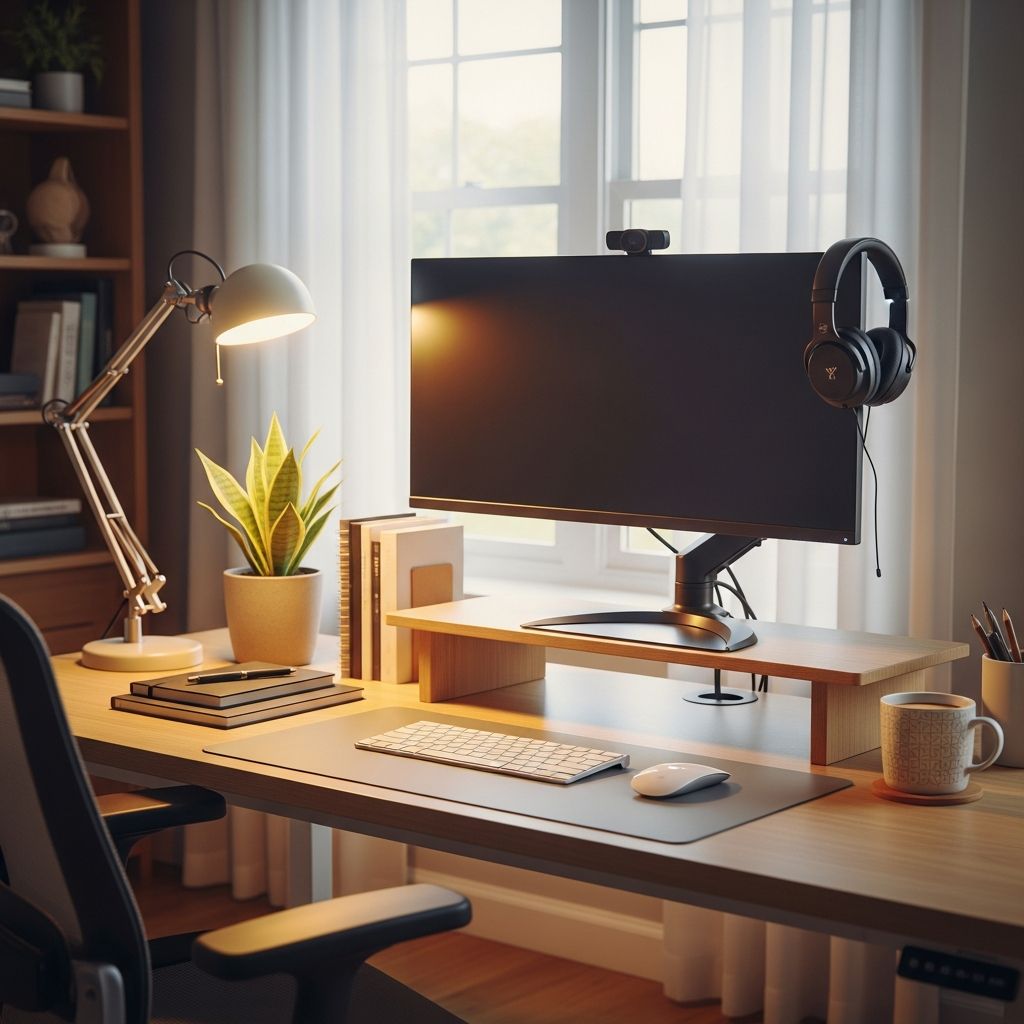
The shift toward remote and hybrid work has fundamentally changed how professionals approach their daily tasks. Unlike traditional office environments, where infrastructure and design are predetermined, working from home requires intentional planning and customization. Your home office serves as your professional command center, and its design directly impacts your productivity, focus, and overall well-being. Creating an effective remote workspace involves much more than simply placing a desk in an empty corner; it requires thoughtful consideration of ergonomics, technology, atmosphere, and personal work style.
The difference between a mediocre home office and an exceptional one often comes down to preparation and understanding what truly supports your work needs. Many remote workers make the mistake of treating their workspace as a temporary setup, only to find themselves struggling with back pain, distractions, or diminished focus. By investing time in designing a proper remote office from the beginning, you establish a foundation that supports both your professional success and personal health.
Understanding Your Specific Work Requirements
Before purchasing furniture or equipment, step back and assess what your work actually demands. The nature of your profession directly influences the physical layout and resources you need. A graphic designer, for instance, has vastly different requirements than a customer service representative or software developer. Understanding these distinctions allows you to allocate your resources strategically and avoid purchasing items that won’t serve your actual workflow.
Consider how you currently work and what aspects of your environment have either supported or hindered your productivity. Think about the types of tasks you perform regularly and the tools required for each. Some professionals need multiple screens for simultaneous reference work, while others primarily use single-screen applications. Your video conferencing frequency also matters significantly; if you spend half your day on calls, you’ll need different setup considerations than someone with occasional meetings.
Document the activities that occupy most of your workweek. These might include deep focus work requiring minimal distractions, collaborative tasks demanding quick communication, administrative duties like email and documentation, or client-facing interactions requiring professional presentation. Once you’ve mapped your typical workday, you can design a space specifically optimized for these activities rather than forcing yourself into a generic one-size-fits-all arrangement.
Establishing Proper Ergonomic Foundations
Ergonomics represents perhaps the most critical investment in a home office, yet many remote workers overlook this dimension. Poor ergonomic setup can lead to chronic pain, reduced productivity, and long-term health consequences that become increasingly difficult to reverse. The human body simply isn’t designed to maintain static positions for extended periods, and without proper support systems, even minor postural issues compound over time.
Your desk height should position your forearms approximately parallel to the ground when sitting with good posture. If you’re using a traditional desk, measure your current setup and consider whether adjustments are necessary. Many professionals benefit from investing in an adjustable standing desk that allows movement throughout the day. The ability to alternate between sitting and standing prevents the physical stress that accompanies static positioning and provides natural variety that enhances circulation and mental alertness.
An ergonomic office chair deserves serious consideration rather than treating it as an incidental expense. Your chair supports your spine for hours daily, and quality seating with proper lumbar support, adjustable height, and breathable materials makes a substantial difference. Look for chairs offering unlimited adjustments to accommodate your unique body proportions and work style.
Monitor placement significantly affects posture and eye strain. If you’re working solely on a laptop screen, consider adding an external monitor positioned at eye level. This adjustment alone prevents the downward neck angle that leads to chronic tension and pain. Your keyboard and mouse should be positioned so your wrists remain neutral rather than bent upward or downward.
For maximum effectiveness, consider consulting with an ergonomic professional who can assess your specific setup and provide personalized recommendations. While this represents an investment upfront, the long-term improvements in comfort and health typically offset the cost substantially through reduced pain and increased productivity.
Optimizing Lighting and Visual Comfort
Lighting fundamentally affects both your ability to focus and your overall well-being. Inadequate or poorly positioned lighting causes eye strain, headaches, and fatigue that accumulate throughout your workday. Natural light should ideally illuminate your face and work surface rather than backlighting your screen, which creates harsh contrasts that strain your vision.
Position your workspace to take advantage of natural daylight, but be intentional about window placement relative to your screens. Backlighting creates glare on monitors and forces your eyes to constantly adjust to dramatic brightness contrasts. If natural light isn’t ideal, supplement with thoughtfully chosen artificial lighting that mimics natural daylight rather than harsh fluorescent options.
Smart lighting systems offer flexibility that adapts to different times of day and work activities. Cool, bright light during mid-afternoon supports focus and alertness, while warmer tones in early morning or evening create a more comfortable atmosphere. The ability to adjust color temperature and intensity throughout your workday allows your lighting to support both productivity and natural circadian rhythms.
Avoid placing lights directly behind you or to the side where they create shadows on your work surface. Overhead lighting combined with task lighting directed at your work area typically creates optimal conditions. Experiment with different arrangements and brightness levels to discover what feels most comfortable for your eyes.
Creating Functional Zones Within Your Space
Even if your home office occupies a single room, thoughtfully dividing the space into distinct zones dramatically improves both functionality and focus. Your primary workspace should contain everything needed for concentrated work: your desk, monitor setup, reference materials, and task lighting. This area should be optimized purely for productivity with minimal visual distractions.
A secondary zone can serve purposes like informal calls, quick internet research, or mentally lighter tasks. This might be a small seating area, a coffee table, or even a standing desk positioned away from your primary workspace. The psychological shift of moving to a different location refreshes your mind and prevents the mental fatigue that comes from static positioning in a single spot for hours.
If space permits, create a genuine break area removed from your workspace. This might be as simple as a comfortable chair in another room where you can truly disconnect during lunch or breaks. The ability to physically leave your office space facilitates genuine mental recovery that improves afternoon productivity and prevents burnout from working within arm’s reach of your job throughout the entire day.
Storage and organization should be distributed throughout these zones rather than concentrated in one location. Keep frequently accessed items within reach of your primary workspace while storing less-used materials in secondary locations. This arrangement maintains a clean, uncrowded primary desk while still making everything accessible.
Selecting Furniture That Supports Flexibility
Quality furniture represents the largest expense in most home office setups, making thoughtful selection essential. Rather than purchasing the first available desk, invest time in understanding your specific requirements. A desk should be large enough to accommodate all your equipment without crowding. If you use external monitors, printers, or other peripherals, measure these items and ensure your desk can hold everything comfortably.
L-shaped or U-shaped desk configurations offer flexibility for professionals needing multiple screen setups or who frequently reference multiple documents simultaneously. Modular furniture systems allow adjustment as your needs evolve, providing flexibility that permanent fixtures cannot match. This approach also accommodates the reality that work preferences shift as you spend time in your space.
Storage solutions should combine accessibility with space efficiency. Multifunctional cabinets that consolidate printer storage, filing systems, and office supplies reduce clutter while maintaining an organized appearance. Mobile filing pedestals work well in smaller spaces where fixed furniture would feel cramped. The goal is maintaining functionality without sacrificing the open, uncluttered feeling that supports focus and reduces visual stress.
Invest in quality over quantity when selecting furniture. A well-made desk, chair, and storage system will last for years and provide daily comfort, whereas cheaper alternatives often deteriorate quickly and require replacement. The long-term cost per use of quality furniture is typically lower than repeated replacement cycles of lower-quality items.
Technology Infrastructure for Seamless Work
Technology integration separates functional home offices from truly productive ones. Your internet connection forms the foundation; ensure you have reliable, high-speed connectivity suitable for video conferencing, file uploads, and collaborative work. If your current internet service is marginal, upgrading should be a priority since bandwidth limitations create constant frustration and undermine professional credibility during important calls.
Multiple monitors significantly enhance productivity for most professionals. A second display eliminates constant window-switching and allows simultaneous reference of multiple documents or applications. This setup is particularly valuable for data entry, programming, design work, or any task requiring regular comparison between different sources.
Video conferencing quality matters significantly in hybrid and remote environments. A quality webcam, external microphone, and proper lighting position you professionally for video calls. Poor video or audio quality undermines your professional presence regardless of your actual credentials or communication skills. These relatively modest investments in equipment have outsized impact on how colleagues perceive your professionalism and attention to detail.
Cable management might seem minor but profoundly affects both the appearance and functionality of your workspace. Tangled cables create visual clutter that increases mental noise and makes equipment adjustments difficult. Invest in cable organizers, clips, and routing solutions that maintain a clean appearance and simplify future modifications.
Controlling Your Acoustic Environment
Sound management directly affects your ability to concentrate and project professionalism during calls. If you live in a noisy environment with external traffic, roommates, or family members, sound treatment becomes essential. Heavy curtains, rugs, and wall hangings absorb sound better than hard surfaces, reducing both external noise and internal echo within your workspace.
For significant noise problems, acoustic panels designed for home studios provide effective sound absorption without expensive structural modifications. These panels can be mounted on walls or positioned strategically to address the most problematic sound sources. Noise-canceling headphones offer personal sound control while maintaining the ability to hear important notifications.
The opposite problem—excessive silence—can also be challenging for some professionals. Ambient background sound, whether soft music, nature sounds, or coffee shop ambiance, helps some people maintain focus better than complete silence. Experiment with different sound environments to determine what supports your concentration rather than assuming silence is universally optimal.
Environmental Comfort and Temperature Control
Temperature significantly influences both productivity and comfort, yet research shows individual preferences vary widely. Rather than assuming a specific temperature is universally ideal, experiment to identify your personal optimum. Some people work best in cool environments, while others need warmth to feel comfortable and focused.
Control your immediate environment through strategic positioning near heat sources or air circulation. A personal heater or fan allows fine-tuning your microclimate without affecting other areas of your home. This personalized approach to temperature management supports sustained focus and prevents the discomfort that leads to frequent breaks or distraction.
Air quality also deserves consideration. Plants improve air quality while providing visual interest that supports well-being. Fresh air circulation prevents the stuffiness that develops in poorly ventilated rooms and contributes to afternoon fatigue. Opening windows periodically, even briefly, refreshes the air and provides a mental break from screen work.
Establishing Boundaries Between Work and Personal Life
Physical workspace design alone is insufficient; you must also establish behavioral boundaries that protect your personal time. When your home and office occupy the same space, the psychological separation that commuting provides disappears. Creating intentional barriers prevents work from consuming your entire living environment and mental space.
Establish a clear starting and ending routine that signals the transition between professional and personal time. This might involve a brief walk, changing clothes, or closing your office door and positioning a physical barrier like a curtain. The ritual itself matters less than consistent, intentional separation that signals to your mind that work time has concluded.
Manage notifications and communication tools intentionally. Turning off email notifications, closing messaging applications, and setting your availability status as offline prevents the constant mental pull toward work that undermines genuine downtime. When teammates understand and respect your working hours, everyone benefits from improved focus and reduced burnout across the team.
Personalizing Your Space for Sustained Motivation
While professional appearance and functional efficiency are important, your workspace should also feel personally welcoming. Sterile, corporate-looking offices lack the elements that sustain motivation over extended periods. Incorporate colors, plants, artwork, and personal items that create a space you genuinely enjoy spending time in.
Color psychology influences mood and focus subtly but meaningfully. Cool tones like blues and greens support calm focus, while warmer tones create friendliness and energy. Consider your predominant work activities when selecting color schemes; a design studio might benefit from more vibrant colors than a writing workspace requiring sustained concentration.
Plants provide both aesthetic benefit and genuine air quality improvements. Even low-maintenance varieties like pothos or snake plants contribute to a more pleasant environment while requiring minimal care. The natural elements provide visual relief from screens and technology, supporting both mental health and eye comfort.
Personal touches—family photos, artwork, mementos from travel or accomplishments—create an environment that feels authentically yours rather than a generic corporate space. This personalization sustains motivation on difficult days and creates a workspace you’re genuinely excited to work within.
Iterative Refinement of Your Setup
A well-designed remote office is never truly finished; it evolves as your needs, preferences, and work requirements change. Rather than treating your initial setup as permanent, approach it as an ongoing project that improves through experimentation and adaptation. You might discover that monitor positioning that seemed ideal initially creates neck strain after a month of use, or that your preferred lighting changes seasonally.
Allow yourself grace as you optimize your environment. Some adjustments cost nothing but time and rearrangement, while others require investment in new equipment. Prioritize changes based on their impact on your daily experience and well-being. Small adjustments that eliminate recurring frustrations often deliver disproportionate improvements to your overall experience.
Document what works and what doesn’t work in your space. Note which furniture arrangements maximize focus, which lighting conditions reduce eye strain, which temperature settings maintain your alertness, and which organizational systems actually reduce clutter in practice. This documentation becomes invaluable when making future investments or modifications.
Frequently Asked Questions
Q: How much should I budget for a home office setup?
A: Budgets vary widely based on needs and existing resources. A basic functional setup might cost $500-1,000, including desk, chair, and monitor. More comprehensive setups with quality ergonomic equipment, multiple monitors, and professional technology can range $2,000-5,000 or higher. Prioritize ergonomic furniture and reliable technology since these directly impact productivity and health.
Q: Can I create an effective home office in a small space?
A: Yes, small spaces can be highly functional with thoughtful planning. Use vertical storage, multifunctional furniture, and wall-mounted elements to maximize usable area. Fold-down desks, mobile storage, and careful organization of equipment make compact spaces work well. The key is ensuring everything you need is accessible without crowding your work surface.
Q: Should I invest in an adjustable standing desk?
A: Standing desks offer significant benefits for most professionals, particularly those working long hours. The ability to alternate between sitting and standing prevents postural stress and keeps circulation active. Quality adjustable desks vary in price, but the health benefits and productivity improvements typically justify the investment for full-time remote workers.
Q: How can I minimize distractions in a shared home?
A: Establish clear communication with household members about your working hours and need for focus. Use noise-canceling headphones or background sound to manage audio distractions. If possible, position your workspace where visual interruptions are minimized. Door closures, room dividers, or dedicated office spaces signal to others that you’re unavailable except for genuine emergencies.
Q: What’s the most important element of a productive home office?
A: While all elements matter, ergonomic comfort deserves top priority. Physical discomfort undermines productivity and focus while creating long-term health consequences. Investing in a quality chair and proper monitor positioning before decorative elements ensures your daily experience supports rather than hinders your work.
References
- Designing for Hybrid Work: Best Practices for 2025 — Future of the Office. 2025. https://www.futureoftheoffice.com/insights/2548824_designing-for-hybrid-work-best-practices-for-2025
- How to create the perfect home office setup for remote working — GitLab Handbook. 2025. https://handbook.gitlab.com/handbook/company/culture/all-remote/workspace/
- Four ways to refresh the office for hybrid working — JLL. 2025. https://www.jll.com/en-us/insights/four-ways-to-refresh-the-office-for-hybrid-working
- Work From Home: A Guide to Designing Your Best Home Office — Copenhagen Living. 2025. https://www.copenhagenliving.com/blog/work-from-home-a-guide-to-designing-your-best-home-office/
- 11 Hybrid Workforce Best Practices For 2026 — People Managing People. 2026. https://peoplemanagingpeople.com/workforce-management/hybrid-workforce-best-practices/

Medha Deb is an editor with a master's degree in Applied Linguistics from the University of Hyderabad. She believes that her qualification has helped her develop a deep understanding of language and its application in various contexts. Medha specializes in the areas of beauty, health, sports, and wellness and is committed to ensuring that the content on the website is…